What is Restore Photos?
Restore Photos is a browser-based service for improving old or blurry face photos with AI. It can suit someone preparing a clearer copy of a family portrait or evaluating a scanned photograph, while retaining the original for comparison.
What does it offer?
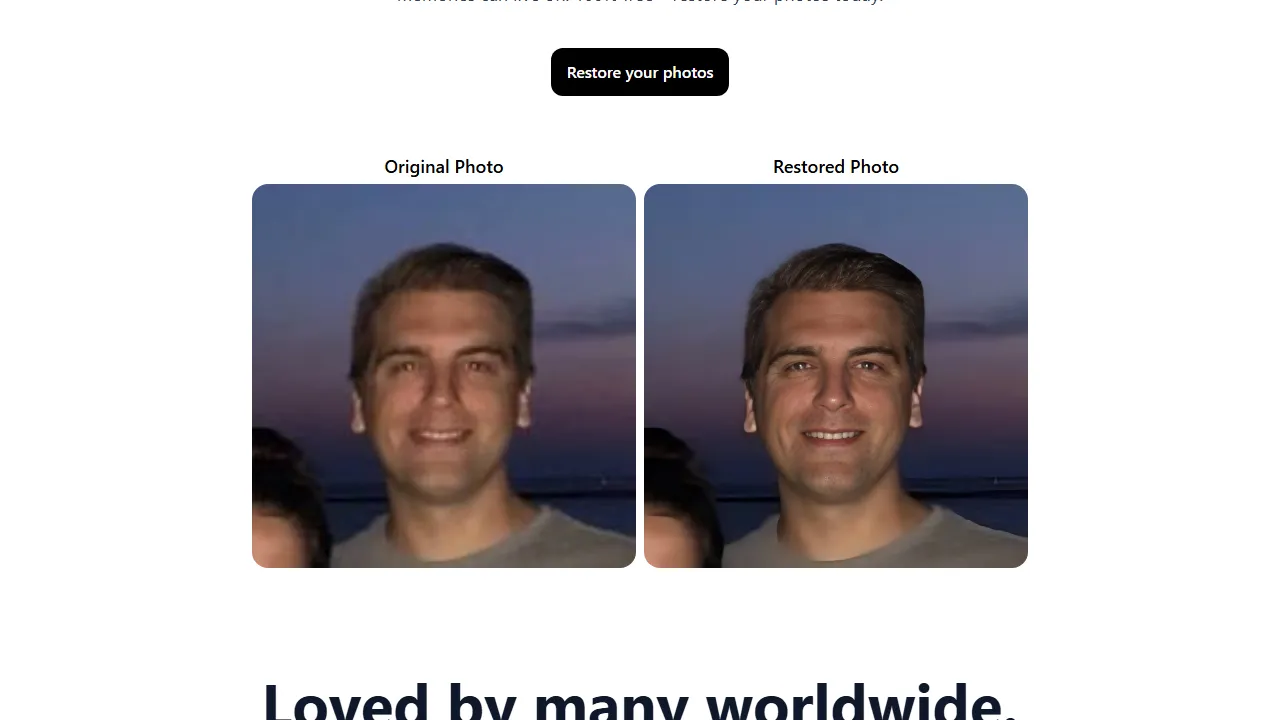
The service focuses on face restoration and offers a side-by-side comparison view. The project linked from the website publishes open-source code for inspection. That does not establish unlimited free access to the hosted service, or make running your own version cost-free; the two have different requirements.
Getting started
- Open the website and choose restoration. The current service interface asks users to sign in with Google.
- Choose a photo you are entitled to upload and retain an original copy. Evaluate one result before committing a large collection.
- Compare facial features and fine detail, then save a suitable version without overwriting the original.
Evaluating the result
Inspect eyes, teeth and face boundaries at a larger scale, then view the image at its intended print or sharing size. A sharper appearance does not prove that generated details reproduce the original scene accurately. For family or archival documentation, identify the processed copy as enhanced and keep the source file alongside it.
Limitations and alternatives
Do not assume identical results for every photograph, or that face restoration also repairs backgrounds and every kind of damage. Check upload terms and privacy before submitting other people’s portraits. If selective manual restoration matters, compare the result with a photo editor that lets you control individual changes.
Access and cost
The sign-in page offers one free photo restoration, while the homepage also advertises paid plans. Unlimited free use is therefore not established. Confirm your current allowance and any additional cost inside the service before paying. A detailed pricing schedule and actual image-processing results were not verified.